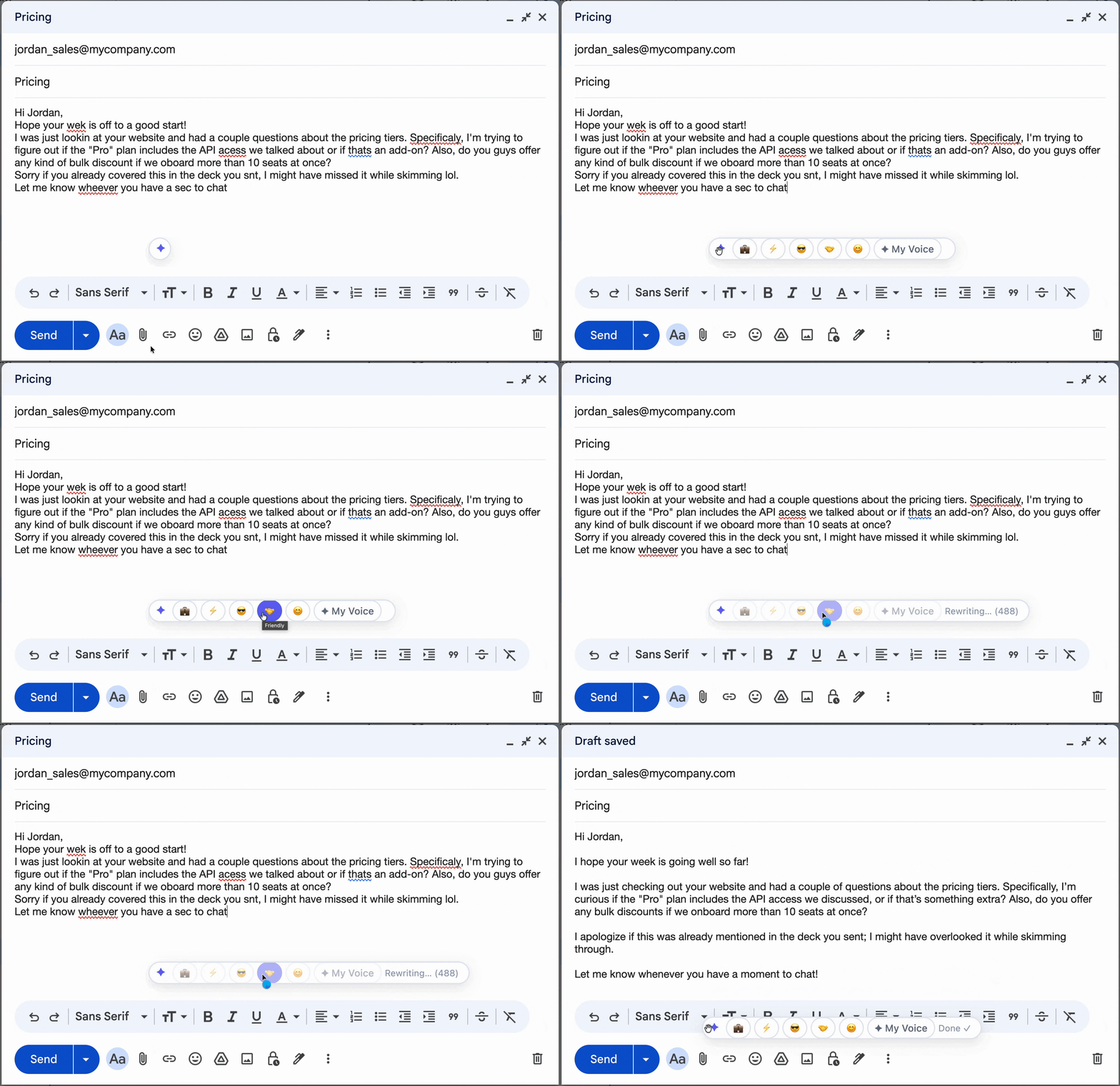
Tonero in action — one click, any text box
A polite email tone uses respectful, considerate language that softens requests, acknowledges the other person's time and effort, and creates a cooperative dynamic — without sacrificing clarity.
Blunt messages create friction. Tonero rewrites your email to be polite and considerate while keeping your intent completely intact. One click.
Tonero in action — one click, any text box
A polite email tone uses respectful, considerate language that softens requests, acknowledges the other person's time and effort, and creates a cooperative dynamic — without sacrificing clarity.
Not every message needs the same register. Here are the situations where professional tone makes the biggest difference.
Messages to leadership benefit from polite framing that shows you're aware of their time and position.
What reads as direct in one culture reads as rude in another. Polite tone is universally safe.
Polite language reduces friction and protects business relationships, especially when raising problems.
Every example below was rewritten by Tonero's AI. Your draft, transformed in one click.
"Fix this bug."
"Could you please take a look at this bug when you have a moment? I'd appreciate your help."
"This is wrong."
"I noticed something here that may need a second look. Could you review it when you get a chance?"
"Why haven't you responded yet?"
"I wanted to follow up on my previous message — please let me know your thoughts when you have a moment."
"I need more time. The deadline doesn't work."
"I'm close to completing this, but I'd benefit from a few more days. Would it be possible to extend the deadline to Friday?"
"I can't make it."
"Thank you so much for the invitation — I'm sorry I'm unable to attend. I hope it goes really well!"
The same starting message, rewritten at different levels of professional tone. Choose the version that fits your context.
Blunt emails create defensiveness and friction — even when your underlying request is completely reasonable. Polite framing communicates the same thing while preserving goodwill. Tonero adds the acknowledgment, the "please", and the warmth that turns a demand into a request.
Worried your email sounds too blunt? Paste it into the free online rewriter → — soften the tone without losing your message.
Point out mistakes without making people feel attacked or embarrassed.
Escalate issues clearly and firmly while still sounding reasonable and professional.
What reads as direct in one culture sounds rude in another. Polite tone is universally safe.
Wrote something curt after a long day? Tonero softens it before you send.
Even with good intentions, these habits can cancel out the effect of a well-toned message. Tonero catches them automatically.
"If you ever get a chance whenever time permits..." buries the ask. Polite should be clear, not vague.
"As previously mentioned..." is technically polite used in a pointed way. It reads as aggressive.
Starting politely and ending curtly creates cognitive dissonance. Maintain consistent tone throughout.
"I humbly request your esteemed attention..." feels robotic and insincere in most modern workplaces.
Tonero adds a tone toolbar to every text box in Chrome, Edge, and Opera. No new tabs. No copy-pasting.
Write however it comes out — rough, fast, unfiltered. Don't worry about tone yet.
Hit the Professional button in the Tonero toolbar. Your message is rewritten instantly, right in place.
Your message sounds exactly right for the situation. Review and hit send.
Tonero supports 6 tones — switch between them with one click, any time, in any text box.
30 free rewrites per month. Works in Gmail, Slack, Teams, LinkedIn, and any website. No credit card required.
Get Tonero it is free