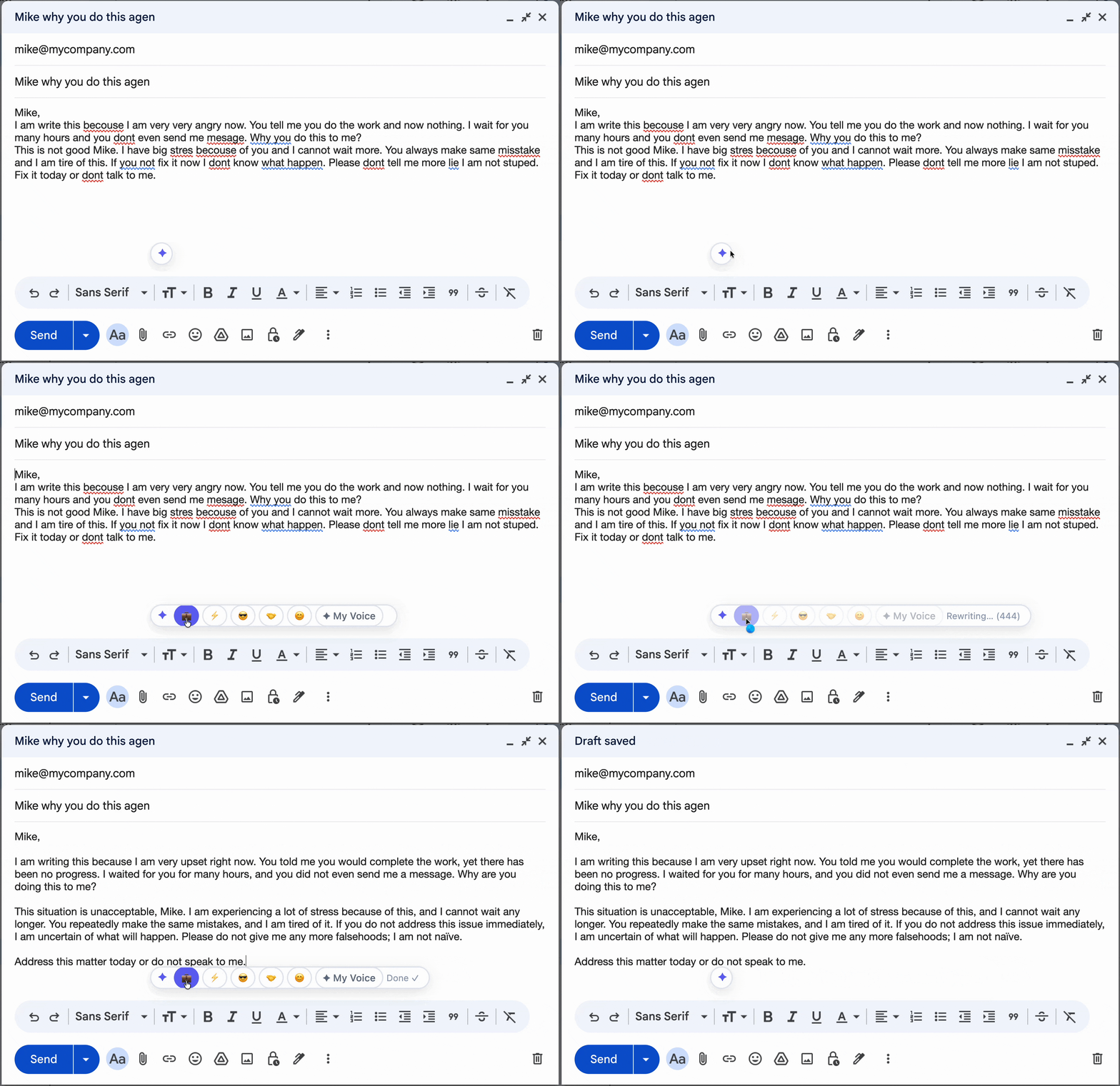
We've all written the email we shouldn't send. Tonero catches it first — rewriting your frustrated, angry, or venting draft into a professional, measured response that still makes your point.
Tonero in action — one click, any text box
De-escalating an angry email means replacing emotional, accusatory language with factual, measured statements that still communicate your concern — without triggering defensiveness or giving someone ammunition to use against you later.
Not every message needs the same register. Here are the situations where professional tone makes the biggest difference.
Write what you feel — then paste it into Tonero before sending. The frustration is valid; the email should be professional.
A calm, factual escalation carries far more weight than an emotional one. It signals you're serious, not reactive.
Emotional responses written late at night are rarely the right ones. Let Tonero cool the heat before it leaves your outbox.
Every example below was rewritten by Tonero's AI. Your draft, transformed in one click.
"This is absolutely unacceptable. You've completely dropped the ball and now everything is ruined."
"I have serious concerns about how this has been handled and I'd like to discuss a path forward. Can we schedule time to talk today?"
"Nobody ever listens to me in this team and I'm sick of being overlooked."
"I feel my input hasn't been considered in recent decisions. I'd like to discuss how we can make team collaboration more inclusive going forward."
"I can't believe you changed this without asking me. This is incredibly disrespectful."
"I wasn't consulted on this change, which disrupted my work. Can we establish a clearer process for decisions that affect my work?"
"You charged me twice and nobody has fixed this. This is OUTRAGEOUS."
"I've been charged twice for the same item and contacted support without resolution. Please escalate this and confirm the correction within 24 hours."
"You promised this would be done last week. I'm furious it's still not finished."
"This was committed for last week and remains incomplete. I need a confirmed revised delivery date today and an explanation of what happened."
The same starting message, rewritten at different levels of professional tone. Choose the version that fits your context.
Angry emails create lasting impressions — and they're usually the wrong ones. Once sent, you can't unsend it. Tonero is the safety net between your raw frustration and your sent box. Write what you feel, click Professional, and send something that actually solves the problem.
Got a heated email you're about to send? Paste it into the free online rewriter → — cool it down to professional tone before you hit send.
That follow-up email you write right after a bad call needs a cool-down pass. Tonero does it in one click.
Defensive, emotional replies damage your credibility. Tonero rewrites them into measured, professional responses.
Your frustration is valid — but you'll get better results with a calm, factual escalation. Tonero keeps the substance, removes the heat.
Tone is invisible in text. What feels like venting can read as aggression. Tonero catches it before it damages a relationship.
Even with good intentions, these habits can cancel out the effect of a well-toned message. Tonero catches them automatically.
The first draft of a frustrated email is almost always the wrong one. Write it, then run it through Tonero.
"You are incompetent" is personal. "This outcome isn't acceptable" is professional. One gets resolved; one gets escalated.
CAPS reads as shouting and puts the recipient on the defensive immediately. Use direct language instead.
"This is unacceptable!" with no specifics is easy to dismiss. Channel the emotion into a clear, factual description of the problem.
Tonero adds a tone toolbar to every text box in Chrome, Edge, and Opera. No new tabs. No copy-pasting.
Write however it comes out — rough, fast, unfiltered. Don't worry about tone yet.
Hit the Professional button in the Tonero toolbar. Your message is rewritten instantly, right in place.
Your message sounds exactly right for the situation. Review and hit send.
Tonero supports 6 tones — switch between them with one click, any time, in any text box.
Frustration often turns passive-aggressive — de-escalate both at once.
After the heat is removed, professional tone ensures the message lands correctly.
Polite tone prevents future friction by setting a more cooperative frame from the start.
30 free rewrites per month. Works in Gmail, Slack, Teams, LinkedIn, and any website. No credit card required.
Get Tonero it is free