Friendly Email Rewriter

Rewrite Email to Be Friendly —
Warm, Human, and Approachable

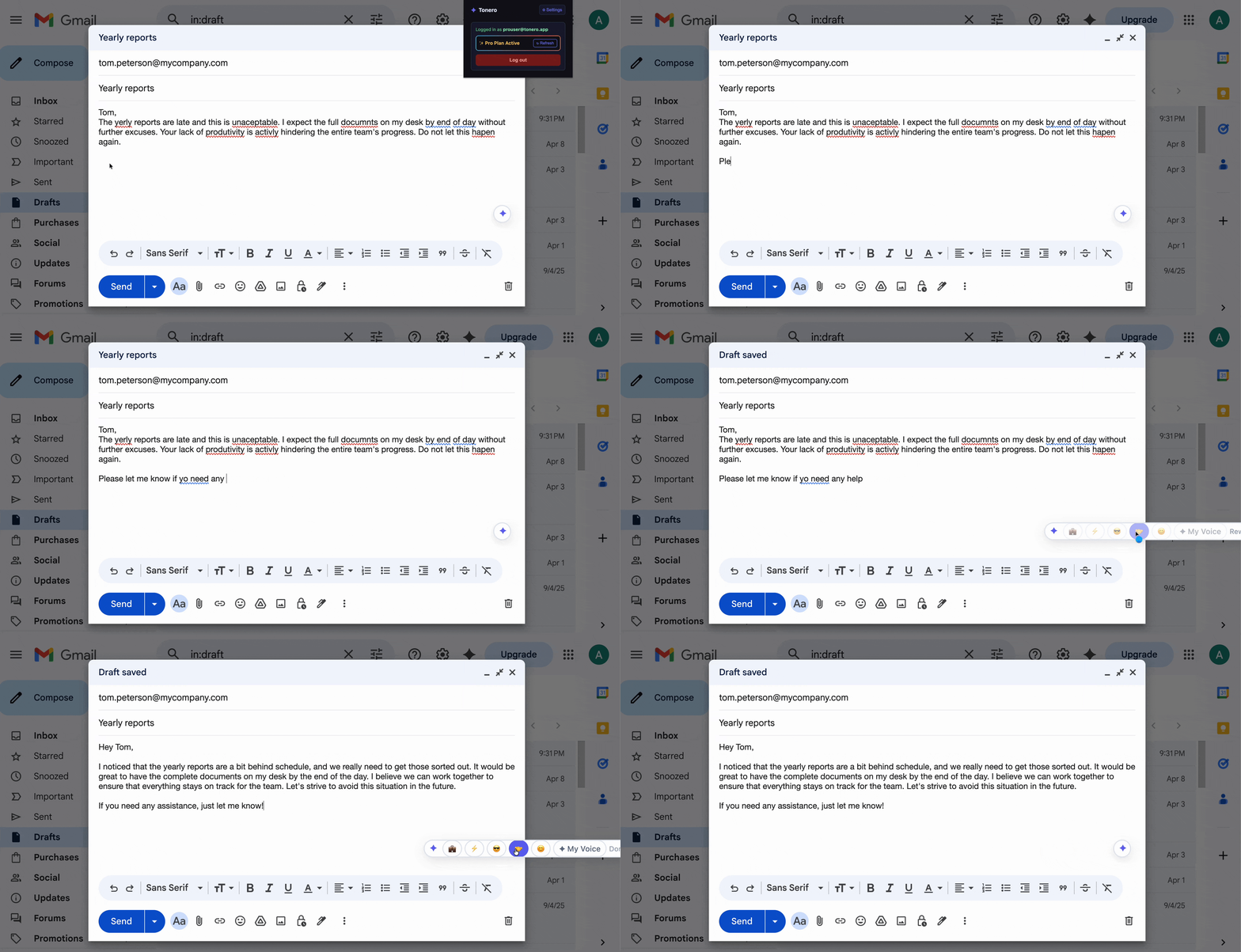
Tonero rewrites any email to sound genuinely friendly and warm — without losing your meaning. One click, right inside Gmail, Slack, Teams, or LinkedIn.

Tonero rewriting a Gmail message to a friendly tone

Tonero in action — one click, any text box

A friendly email tone sounds genuinely warm, approachable, and human. It creates connection and goodwill without losing your meaning — people feel like they're hearing from a person, not a corporate template.

When to use a friendly tone

Not every message needs the same register. Here are the situations where friendly tone makes the biggest difference.

With colleagues & teammates

Friendliness builds trust and goodwill over time, making collaboration easier and improving team morale.

Customer-facing messages

Customers who feel warmly treated are more loyal and more forgiving when things go wrong.

Reconnecting & cold outreach

A friendly tone lowers guard and significantly increases reply rates on LinkedIn, email, and Slack.

Rewrite Email to Be Friendly — real examples

Every example below was rewritten by Tonero's AI. Your draft, transformed in one click.

Before

"The deadline was yesterday. Where is the report?"

🤝 Friendly

"Hey! Just checking in on the report — it was due yesterday. No worries, let me know if you need anything to get it across the line!"

Before

"We can't accommodate this request."

🤝 Friendly

"Thanks so much for reaching out! This particular request is outside what we're able to do right now, but I'd love to find another way to help. What else might work for you?"

Before

"I'll be at the meeting."

🤝 Friendly

"I'd love to join — really looking forward to catching up with everyone!"

Before

"Your start date is Monday."

🤝 Friendly

"We're really excited to have you join us on Monday! Can't wait to introduce you to the team — it's going to be great having you here."

Before

"The project is behind. I need an update."

🤝 Friendly

"Hey! Just wanted to touch base on the project — it looks like things might be a bit behind. Is there anything I can help unblock?"

See the spectrum: one message, three intensities

The same starting message, rewritten at different levels of friendly tone. Choose the version that fits your context.

Slightly Friendly
"The report is due Friday. Please send it over."
"Hey — just a quick reminder that the report is due Friday. Can you send it over when it's ready? Thanks!"
Very Friendly
"The report is due Friday. Please send it over."
"Hi! Hope your week's going well 😊 The report is due Friday — whenever you're done, just send it my way. Really appreciate your help on this!"
Friendly but Professional
"The report is due Friday. Please send it over."
"Friendly reminder that the report is due Friday — please do send it over by end of day. Thanks so much!"

Why a friendly tone gets more replies

People respond better when they feel a genuine human connection. A friendly email lowers defenses, builds trust, and increases the likelihood of a positive reply. Tonero adds that warmth to any message in one click — without rewriting it yourself.

Need to warm up a cold-sounding email? Try the free online email rewriter → — paste your draft and switch to Friendly tone instantly.

Customer support replies

Turn standard, robotic responses into messages that make customers feel genuinely heard and appreciated.

LinkedIn outreach

Cold outreach that sounds friendly and human gets far more replies than stiff, formal messages.

Reconnecting with contacts

Reaching out after a long gap? A friendly tone makes the message feel natural instead of awkward.

Team communication

Keep morale high with messages that feel warm and encouraging, even when discussing difficult topics.

Common mistakes that undermine friendly tone

Even with good intentions, these habits can cancel out the effect of a well-toned message. Tonero catches them automatically.

Forced cheerfulness

"Hope this finds you well!" reads as hollow. Genuine friendliness sounds specific and personal, not templated.

Overusing emojis

One or two emojis add warmth; five in a row looks unprofessional and undermines your message.

Sacrificing clarity

Friendliness shouldn't bury the ask. State what you need — just do it warmly and clearly.

Wrong-context casualness

Friendly doesn't mean casual in every setting. Match warmth to the relationship and the stakes.

Three seconds to a better message

Tonero adds a tone toolbar to every text box in Chrome, Edge, and Opera. No new tabs. No copy-pasting.

01

Type your draft

Write however it comes out — rough, fast, unfiltered. Don't worry about tone yet.

02

Click 🤝 Friendly

Hit the Friendly button in the Tonero toolbar. Your message is rewritten instantly, right in place.

03

Send with confidence

Your message sounds exactly right for the situation. Review and hit send.

Other tones you can try

Tonero supports 6 tones — switch between them with one click, any time, in any text box.

Try the Friendly Email Rewriter — free

30 free rewrites per month. Works in Gmail, Slack, Teams, LinkedIn, and any website. No credit card required.

Get Tonero it is free