Confident Email Rewriter

Rewrite Email to Sound Confident —
Clear, Assertive, and Credible

Over-apologizing? Hedging everything? Tonero rewrites your email to sound confident and assertive — without being aggressive. One click, right where you type.

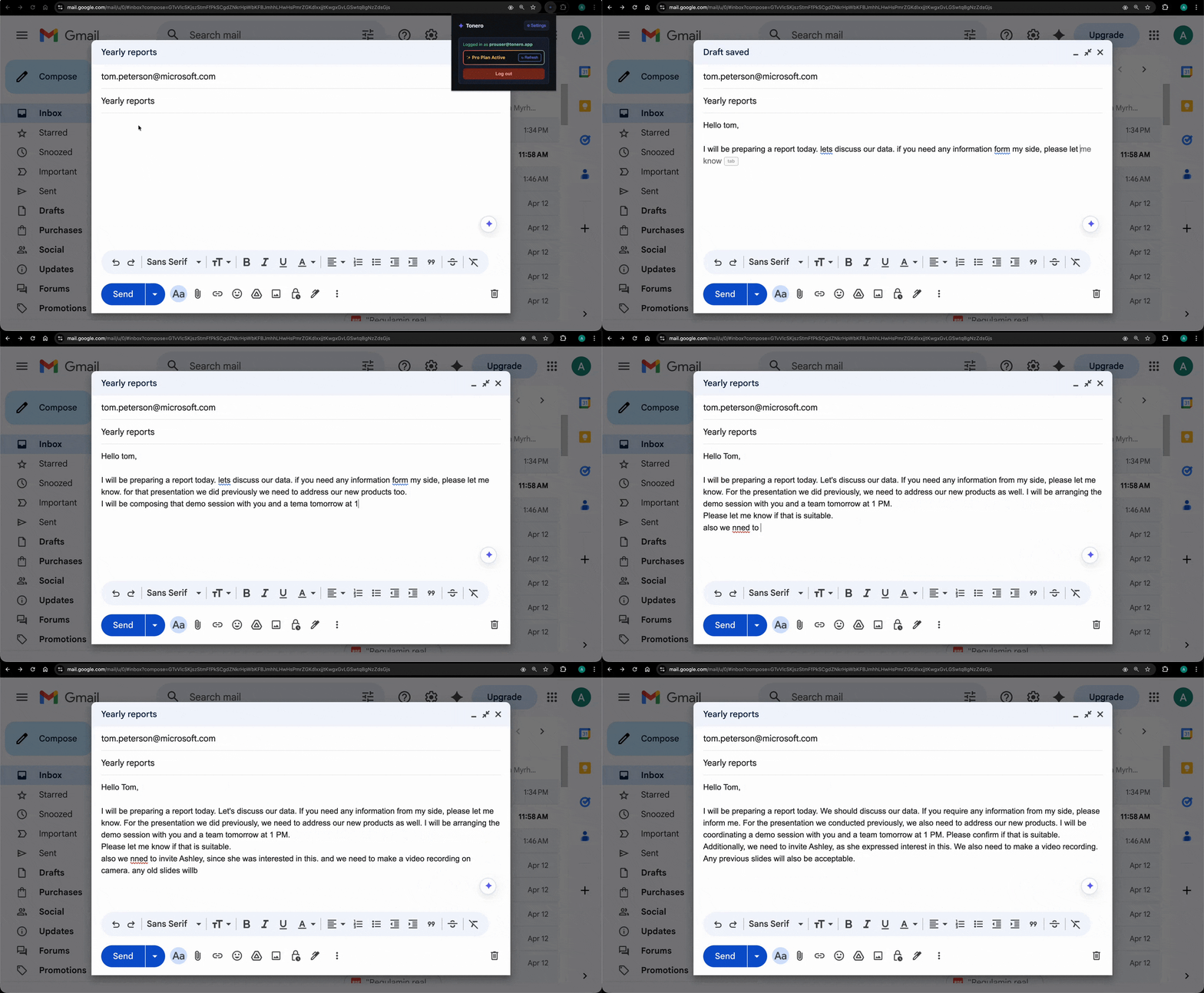
Tonero rewriting a Gmail message to sound confident and assertive

Tonero in action — one click, any text box

A confident email tone is clear, direct, and free of over-apologizing, excessive hedging, and unnecessary qualifiers. It signals that you know your value and expect to be taken seriously — without crossing into aggression.

When to use a direct tone

Not every message needs the same register. Here are the situations where direct tone makes the biggest difference.

Salary & promotion discussions

Confidence signals your request is legitimate. Hedging makes it easy to dismiss. Walk in assertive.

Pitching ideas & proposals

"I think this might work" loses to "This will work. Here's why." Confident writing gets proposals taken seriously.

Following up on overdue items

Following up tentatively gets ignored. A confident follow-up communicates that action is expected.

Rewrite Email to Sound Confident — real examples

Every example below was rewritten by Tonero's AI. Your draft, transformed in one click.

Before

"Sorry to bother you, but if you have time, you might want to maybe look at this?"

⚡ Direct

"Could you please review this when you get a chance? I'd value your input."

Before

"I'm not sure if this is right, but I kind of think we maybe should try something different?"

⚡ Direct

"I recommend we take a different approach here. Happy to walk through my reasoning."

Before

"I was wondering if it might be possible, if it's not too much trouble, to maybe discuss a raise?"

⚡ Direct

"I'd like to discuss adjusting my compensation to better reflect my contributions. Can we schedule time to talk?"

Before

"I don't want to be a pest, but did you maybe get a chance to look at the report?"

⚡ Direct

"Following up on the report — I need it by Thursday to keep our timeline on track."

Before

"I'm not sure if I'm reading this right, but I kind of feel like maybe this might not be the best approach?"

⚡ Direct

"I'd like to flag a concern with this approach. Happy to walk through my reasoning — can we schedule 15 minutes?"

See the spectrum: one message, three intensities

The same starting message, rewritten at different levels of direct tone. Choose the version that fits your context.

Quietly Confident
"I was just wondering if maybe you might have time to look at the proposal?"
"When you get a chance, I'd appreciate your thoughts on the proposal."
Assertively Confident
"I was just wondering if maybe you might have time to look at the proposal?"
"Please review the proposal when you're free. I'd value your feedback before Friday."
Confident and Direct
"I was just wondering if maybe you might have time to look at the proposal?"
"I need your feedback on the proposal by Friday. Can you commit to that?"

Why confident emails get more done

Hedging, over-apologizing, and excessive qualifiers make your emails easier to ignore. Confident writing commands attention and signals that you know your value. Tonero strips the filler language and delivers your message with the assertive edge it needs — without tipping into aggression.

Have an email full of "just" and "sorry"? Paste it into the free online rewriter → — strip the hedging and sound confident in seconds.

Salary negotiations

Sound credible and self-assured when discussing compensation — not like you're apologizing for asking.

Pitching ideas to leadership

A confident email gets your proposal taken seriously instead of filed away for later.

Client proposals

Clients sign with people who sound certain. Confident tone signals expertise and reduces doubt.

Non-native English speakers

Language uncertainty can cause unintentional hedging. Tonero removes the hesitation and keeps the confidence.

Common mistakes that undermine direct tone

Even with good intentions, these habits can cancel out the effect of a well-toned message. Tonero catches them automatically.

Triple hedging

"I was just wondering if maybe you might..." — stacking qualifiers signals uncertainty. One is often enough; zero is stronger.

Reflexive apologizing

"Sorry to bother you, but..." trains others to see your asks as optional.

Passive voice shielding

"Mistakes were made" avoids accountability. Active voice always projects more confidence.

False-urgency softeners

"No rush at all!" on a genuinely urgent request creates confusion about actual importance.

Three seconds to a better message

Tonero adds a tone toolbar to every text box in Chrome, Edge, and Opera. No new tabs. No copy-pasting.

01

Type your draft

Write however it comes out — rough, fast, unfiltered. Don't worry about tone yet.

02

Click ⚡ Direct

Hit the Direct button in the Tonero toolbar. Your message is rewritten instantly, right in place.

03

Send with confidence

Your message sounds exactly right for the situation. Review and hit send.

Other tones you can try

Tonero supports 6 tones — switch between them with one click, any time, in any text box.

Try the Confident Email Rewriter — free

30 free rewrites per month. Works in Gmail, Slack, Teams, LinkedIn, and any website. No credit card required.

Get Tonero it is free