Professional Email Rewriter

Rewrite Email to Sound Professional —
Polished, Business-Ready, Every Time

Casual message in a professional context? Tonero rewrites any rough, slangy, or informal email to sound polished and business-ready — without changing your meaning. One click.

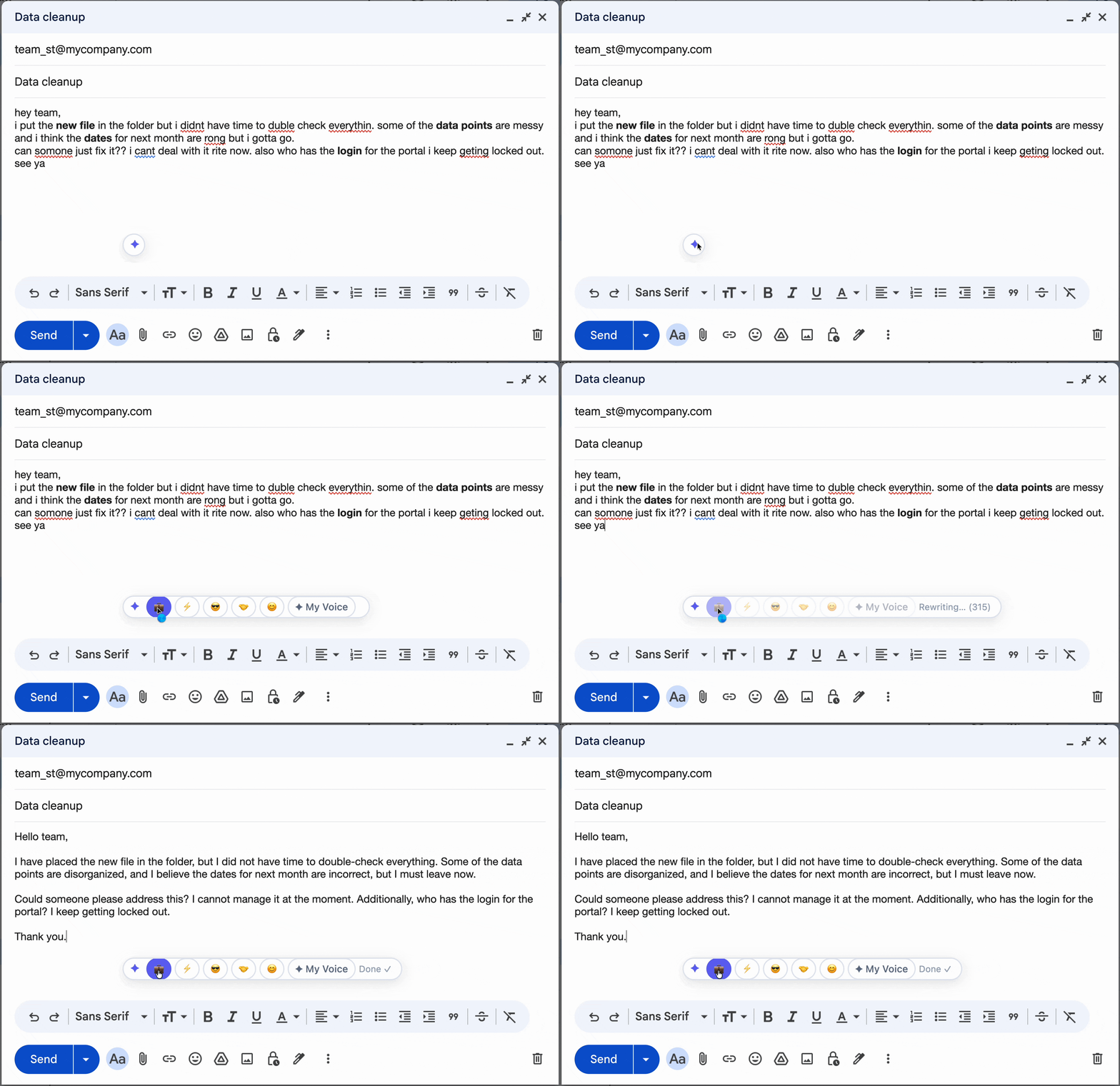
Tonero rewriting a Gmail draft to a professional tone

Tonero in action — one click, any text box

A professional email tone follows business-communication norms: clear structure, appropriate formality for the context, polished language, and a register that signals competence and reliability — regardless of what the draft looked like before.

When to use a professional tone

Not every message needs the same register. Here are the situations where professional tone makes the biggest difference.

Client-facing communication

Every email to a client is a brand touchpoint. Professional tone builds trust and signals reliability.

Job seeking & applications

Recruiter and hiring manager emails are high-stakes. Professional tone shows you understand business norms.

Senior leadership updates

Executives value clarity and professionalism. Casual language in updates signals a lack of situational awareness.

Rewrite Email to Sound Professional — real examples

Every example below was rewritten by Tonero's AI. Your draft, transformed in one click.

Before

"hey just checking if u got my email from last week??"

💼 Professional

"I wanted to follow up on the email I sent last week. Please let me know if you have any questions or need additional information."

Before

"yeah we can do that call tmrw, works 4 me"

💼 Professional

"I'm available for a call tomorrow. Please let me know what time works best for you, and I'll confirm."

Before

"the client keeps bugging us and its getting annoying what do we do"

💼 Professional

"The client has been following up frequently. I'd like to align on the best approach to address their concerns — can we connect briefly today?"

Before

"there might be a problem with the launch thing tomorrow fyi"

💼 Professional

"I want to flag a potential risk with tomorrow's launch. I'd recommend a brief review before we proceed — can we connect in the next hour?"

Before

"hey could u write me a reference? need it soon thx"

💼 Professional

"I hope you're well. I'm applying for a new position and would be grateful if you'd be willing to provide a reference. Please let me know if you're comfortable doing so."

See the spectrum: one message, three intensities

The same starting message, rewritten at different levels of professional tone. Choose the version that fits your context.

Slightly Professional
"hey can we chat abt the thing from yesterday?? its kinda urgent lol"
"Hey — can we find time to discuss what came up yesterday? It's fairly time-sensitive."
Business Professional
"hey can we chat abt the thing from yesterday?? its kinda urgent lol"
"Do you have time for a quick call today? I'd like to discuss the issue from yesterday — it's moderately urgent."
Very Formal
"hey can we chat abt the thing from yesterday?? its kinda urgent lol"
"Could we schedule a call at your earliest convenience? I'd like to address the matter that arose yesterday, which I'd characterize as time-sensitive."

Why professional tone matters more than you think

Your email tone is your professional reputation in text. Casual language in the wrong context signals carelessness. A single poorly-toned email to a client or senior leader can undermine months of trust-building. Tonero ensures every message represents you at your best.

Have an email you need to fix right now? Try the free online email rewriter → — paste your draft, pick a tone, and get a polished version instantly.

Client-facing emails

Every email to a client represents your brand. Professional tone builds trust and signals competence.

Job applications & interviews

Make your emails to recruiters and hiring managers count with polished, professional language.

Senior stakeholder updates

Executives expect clear, professional communication. Tonero ensures you always deliver it.

Non-native English speakers

Write naturally in your own rhythm, then let Tonero bring it up to professional English standards.

Common mistakes that undermine professional tone

Even with good intentions, these habits can cancel out the effect of a well-toned message. Tonero catches them automatically.

Slang in formal contexts

"gonna jump on that ASAP tbh" addresses a professional situation with completely wrong register.

Overly casual openers

"Hope ur weekend was good!!" before a business proposal reads as careless, not personable.

Autocorrect disasters

Unreviewed autocorrect errors signal carelessness that undermines your professional image.

Context-blind formality

"As per my previous correspondence..." can be appropriate or painfully stiff. Tonero calibrates to the right level.

Three seconds to a better message

Tonero adds a tone toolbar to every text box in Chrome, Edge, and Opera. No new tabs. No copy-pasting.

01

Type your draft

Write however it comes out — rough, fast, unfiltered. Don't worry about tone yet.

02

Click 💼 Professional

Hit the Professional button in the Tonero toolbar. Your message is rewritten instantly, right in place.

03

Send with confidence

Your message sounds exactly right for the situation. Review and hit send.

Other tones you can try

Tonero supports 6 tones — switch between them with one click, any time, in any text box.

Try the Professional Email Rewriter — free

30 free rewrites per month. Works in Gmail, Slack, Teams, LinkedIn, and any website. No credit card required.

Get Tonero it is free