Passive-Aggressive Email Fixer

Rewrite a Passive-Aggressive Email —
Say What You Mean, Without the Sting

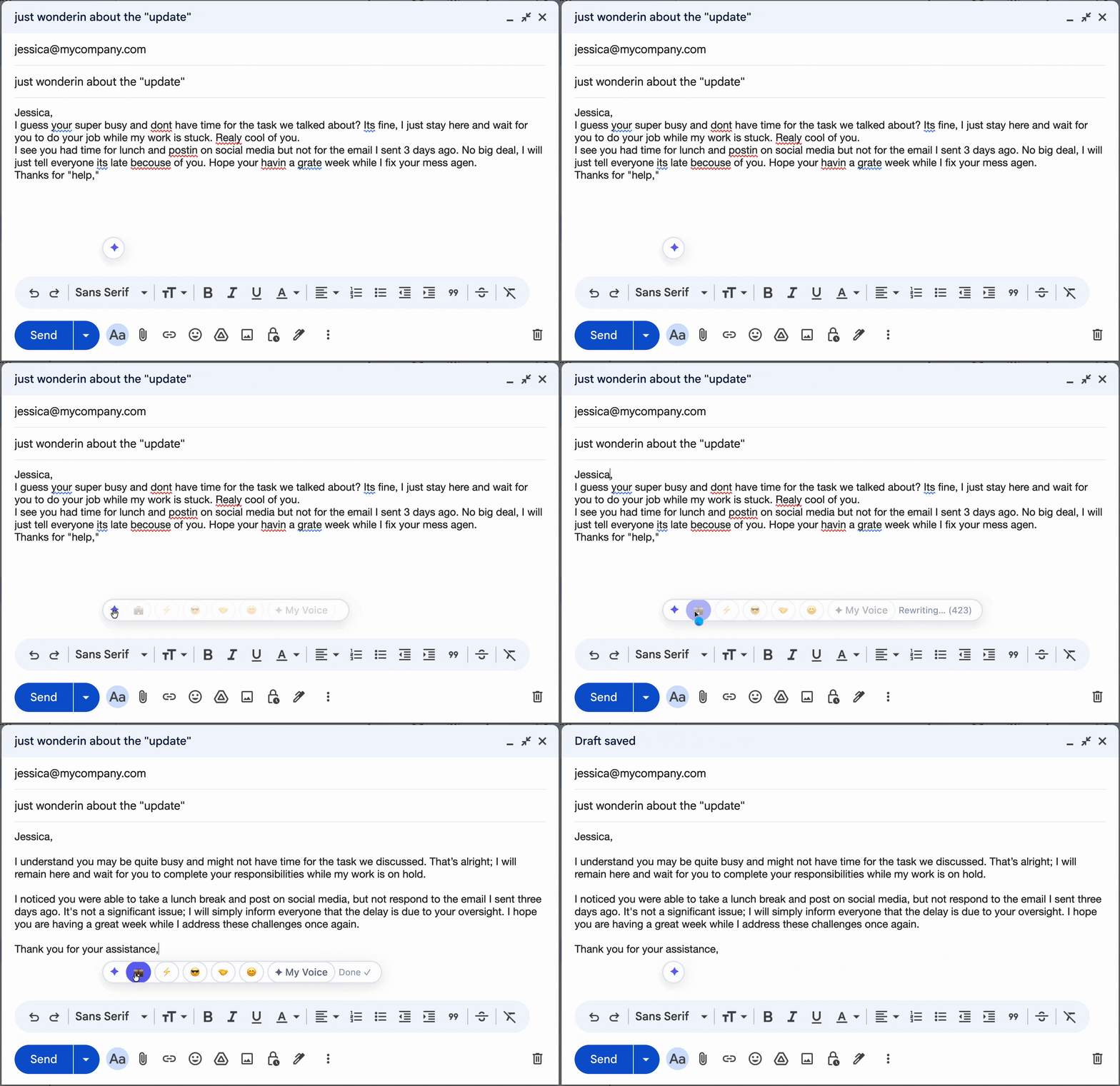
"As I mentioned before…" "Not sure if you saw my last three emails…" "Fine, I'll just do it myself." Tonero rewrites the subtext into something direct, professional, and clean.

Tonero rewriting a passive-aggressive Slack message to a direct, professional tone

Tonero in action — one click, any text box

Passive-aggressive emails express frustration indirectly — through sarcasm, backhanded phrasing, or loaded language. They backfire because recipients feel attacked without being told how to fix anything. The solution is converting subtext into explicit, direct language.

When to use a direct tone

Not every message needs the same register. Here are the situations where direct tone makes the biggest difference.

Repeated follow-ups with no reply

After multiple unanswered messages, your tone naturally sharpens. Tonero reframes the follow-up as professional, not passive-aggressive.

After being overruled or dismissed

When your input was ignored and the result was bad, it's tempting to say "I told you so." Direct language is far more credible.

Shared-responsibility failures

"You didn't do X" creates defensiveness. Converting it into factual statements opens the door to solutions.

Rewrite a Passive-Aggressive Email — real examples

Every example below was rewritten by Tonero's AI. Your draft, transformed in one click.

Before

"As I mentioned in my PREVIOUS email — which I sent THREE TIMES — the deadline is Friday."

⚡ Direct

"Just to confirm: the deadline is this Friday. Please let me know if you have any questions."

Before

"Not sure if you saw my last three emails, but this is getting pretty urgent."

⚡ Direct

"I'm following up on my previous messages — this matter requires attention soon. Please let me know your current status."

Before

"Fine. I'll just handle it myself since nobody else seems to be."

⚡ Direct

"I'll take ownership of this. Please keep me updated on any developments that might affect my timeline."

Before

"No worries, I guess I'll just redo the whole thing then."

⚡ Direct

"I'll redo the section. Could you clarify exactly what changes are needed so I can get it right this time?"

Before

"I notice this is the third time the meeting has been rescheduled."

⚡ Direct

"The meeting has been rescheduled a few times. To make sure we connect, could you suggest a time that works reliably for you?"

See the spectrum: one message, three intensities

The same starting message, rewritten at different levels of direct tone. Choose the version that fits your context.

Still Pointed but Better
"Not sure if you saw my last three emails, but the deadline was Monday."
"The deadline was Monday and I've followed up a few times. Can you give me a status update today?"
Direct
"Not sure if you saw my last three emails, but the deadline was Monday."
"The deadline passed on Monday. I need a status update and a revised delivery estimate."
Professionally Direct
"Not sure if you saw my last three emails, but the deadline was Monday."
"Following up: the deadline was Monday and I haven't received the deliverable. Please confirm current status and expected completion date."

Why passive-aggressive emails backfire

Passive aggression feels satisfying to write but creates the opposite of the result you want. It signals emotional dysregulation, frustrates the recipient, and rarely gets you what you're asking for. Tonero converts the subtext into direct, assertive language — so your message actually lands.

Caught yourself writing something passive-aggressive? Paste it into the free online rewriter → — turn it into a direct, professional message in seconds.

Frustration at being ignored

Instead of sighing in text, state the problem directly. Tonero turns the snark into a clear, actionable ask.

Repeated follow-ups

Following up for the fourth time feels passive-aggressive by nature. Tonero reframes it as a professional follow-up.

Team conflict

Passive aggression escalates conflict. Direct, professional language resolves it.

Written in exhaustion

Late nights produce passive-aggressive drafts. Run it through Tonero before you hit send.

Common mistakes that undermine direct tone

Even with good intentions, these habits can cancel out the effect of a well-toned message. Tonero catches them automatically.

"Per my last email"

This phrase is universally understood as passive-aggressive. Reference previous messages neutrally if at all.

Excessive emphasis

"The deadline is FRIDAY" or "as I mentioned THREE TIMES" reads as aggressive, not emphatic.

Sarcastic affirmatives

"Oh great, another last-minute change." — sarcasm in professional email damages trust and is nearly impossible to walk back.

"I'll just do it myself"

This implies others are failing without giving them a chance to respond. State the situation directly instead.

Three seconds to a better message

Tonero adds a tone toolbar to every text box in Chrome, Edge, and Opera. No new tabs. No copy-pasting.

01

Type your draft

Write however it comes out — rough, fast, unfiltered. Don't worry about tone yet.

02

Click ⚡ Direct

Hit the Direct button in the Tonero toolbar. Your message is rewritten instantly, right in place.

03

Send with confidence

Your message sounds exactly right for the situation. Review and hit send.

Other tones you can try

Tonero supports 6 tones — switch between them with one click, any time, in any text box.

Try the Passive-Aggressive Email Fixer — free

30 free rewrites per month. Works in Gmail, Slack, Teams, LinkedIn, and any website. No credit card required.

Get Tonero it is free