Tonero for Gmail

Rewrite Gmail Emails to the Right Tone —
Right Inside Your Inbox

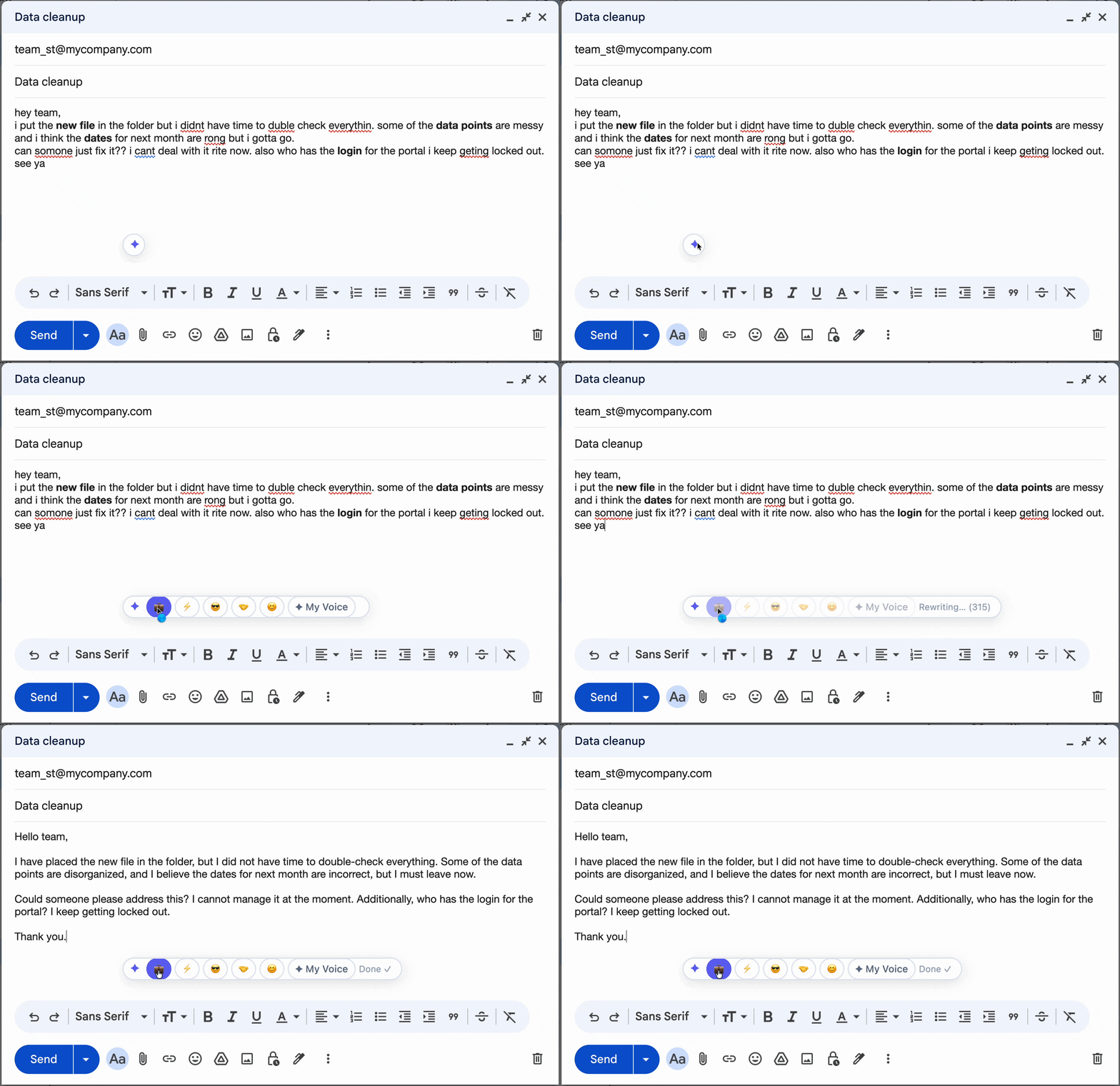
Tonero adds a one-click tone toolbar directly to Gmail's compose window. Write your draft, click a tone, and send a polished email — without copying, pasting, or switching tabs.

Tonero rewriting a Gmail draft to a professional tone in one click

Tonero inside Gmail — one click to the right tone

Tonero works inline: you write your email in Gmail normally, then click a tone button (Professional, Direct, Friendly, Confident) in the Tonero toolbar that appears in the compose window. The message is rewritten in place — no new tab, no copy-paste.

When Tonero makes the biggest difference in Gmail

Not every email needs the same tone. Here's where one click changes everything.

Replying to clients

A rushed reply can read as curt or careless. Tonero rewrites it to sound thoughtful and professional before you hit send.

Emailing your manager

Writing up to your organizational chart is different from writing to peers. Tonero adjusts for appropriate formality without losing your meaning.

Cold outreach

First impressions live or die on tone. Tonero makes cold emails sound confident and direct without reading as presumptuous.

Sending feedback or bad news

Difficult messages need care. Tonero helps you stay constructive and professional when the content is inherently negative.

Non-native English writers

Write naturally, then let Tonero bring it up to native-level professional English — preserving your meaning exactly.

Drafts written in haste

Fast finger writing leads to rough drafts. Tonero polishes any rough draft in one click without slowing you down.

Real Gmail rewrites — before and after Tonero

Every example below was rewritten by Tonero. Your draft, transformed in one click.

Draft in Gmail

"hey just following up on the proposal again, any update??"

💼 Professional

"I wanted to follow up on the proposal I sent over. Please let me know if you have any questions or need additional information — happy to jump on a quick call."

Draft in Gmail

"the deadline is tomorrow so i need this done today please"

⚡ Direct

"The deadline is tomorrow. I need this completed by end of day today."

Draft in Gmail

"glad we could finally get this figured out, it was kind of stressful lol"

☀️ Friendly

"Really glad we got this sorted out! It was a bit of a process, but I'm happy with where we landed. Looking forward to what's next."

Draft in Gmail

"i think maybe we could try a different approach? just an idea though not sure"

💪 Confident

"I'd recommend taking a different approach here. I think it would deliver better results — happy to walk through the reasoning if useful."

Three seconds to a better Gmail email

Tonero appears automatically in Gmail once installed. No setup, no configuration — just open Gmail and compose.

01

Open Gmail & compose

Open Gmail normally. Tonero's tone toolbar appears automatically in every compose and reply window.

02

Write your draft

Type however it comes out. Don't worry about phrasing or tone — write fast and rough.

03

Click a tone & send

Hit Professional, Direct, Friendly, Confident, or any tone. Your email is rewritten instantly, right in the compose box. Review and send.

Why professionals prefer Tonero over rewriting manually

Gmail's built-in AI helps with drafts. Tonero does something different: it rewrites your existing draft to a specific tone you choose, without changing your meaning.

Curious how it works? Try the live demo → — see Tonero rewrite a real email in seconds, no install needed.

Tone you choose

Professional, Direct, Friendly, Confident, Polite, or your own custom voice. You pick the tone — Tonero executes it precisely.

Works in the compose window

No new tab, no copy-pasting. Your email is rewritten right inside Gmail — where you're already working.

Preserves your meaning

Tonero changes how you sound, not what you're saying. Your facts, requests, and structure stay intact.

Works across Google Workspace

Tonero also works in Google Chat, Google Docs comments, and any web-based text field — not just Gmail.
More tools for better email

Install Tonero for Gmail — free

30 free rewrites per month. Works in Gmail, Slack, Teams, LinkedIn, and any website. No credit card required.

Get Tonero it is free