Tonero for Microsoft Teams

Communicate Better in
Microsoft Teams — One Click

Teams is where enterprise decisions get made, cultures get shaped, and reputations get built. Tonero adds a tone toolbar to every Teams message box so you always sound the way you intend.

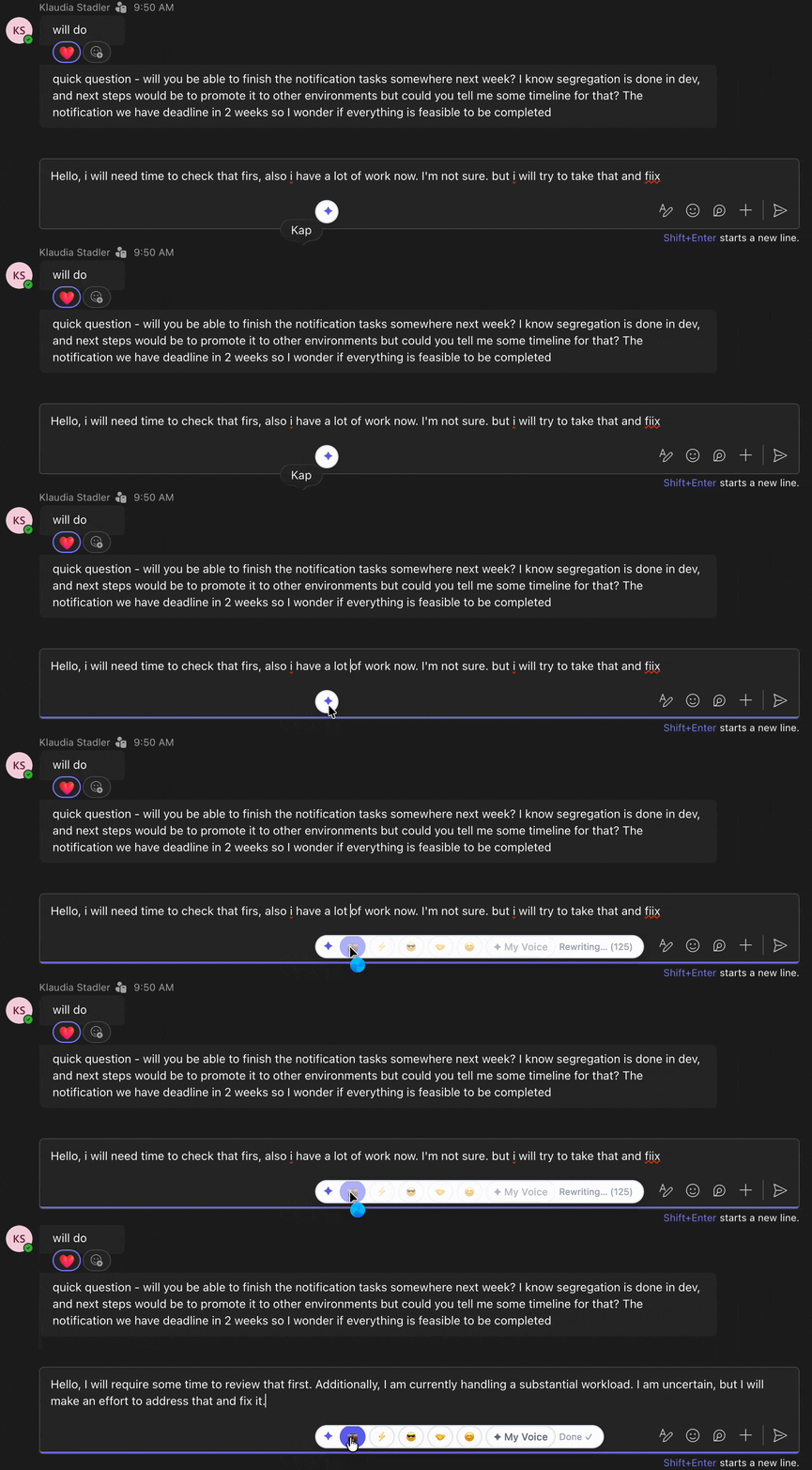
Tonero rewriting a Microsoft Teams message to a professional tone in one click

Tonero in action — one click, any text box including Teams

Microsoft Teams is used by over 300 million people daily. Every message you send — to a manager, a stakeholder, or a client — contributes to your professional brand. Tonero ensures your tone is intentional, not accidental.

Where tone makes the biggest difference in Teams

Teams spans everything from quick pings to senior leadership updates. The stakes vary — your tone should too.

Project status updates

Channel updates are read by the whole project team, including stakeholders. Professional, clear tone signals competence and reliability.

Meeting follow-ups

Post-meeting summaries shape the record. Tonero makes action items and decisions sound clear and authoritative.

Messages to senior leadership

Executives read quickly and form judgments fast. Tonero ensures your message to leadership is direct, professional, and concise.

Cross-department requests

Asking something of another team requires the right tone — assertive enough to be taken seriously, polite enough to build goodwill.

Raising issues or concerns

Flagging a problem risks sounding like complaining. Tonero rewrites concerns to sound constructive and solution-focused.

Client or external collaboration

Teams is increasingly used for client-facing communication. Tonero ensures your messages meet external professional standards.
Teams messages — before and after Tonero

Real Teams scenarios. One click to a more professional message.

Teams draft

"I used to re-read every Teams message three times before sending. Now I just type fast and hit Professional."

Real user

Actual Tonero user — saves 30+ minutes a day on reviewing messages before sending.

Teams draft

"we're behind on this and honestly not sure we'll make the deadline tbh"

💼 Professional

"We're currently behind schedule on this deliverable. I'd like to align on a revised timeline and discuss what support we might need to get back on track."

Teams draft

"can we just make a decision on this already? its been going back and forth too long"

⚡ Direct

"We need to land on a decision here. Can we set a deadline for this discussion — say, end of day tomorrow?"

Teams draft

"great job everyone!! the client loved it!! 🎉🎉🎉"

☀️ Friendly

"Great work from the whole team — the client was really pleased with the outcome. Well deserved recognition all around."

Three seconds to a better Teams message

Tonero works in Teams in the browser — on app.teams.microsoft.com. Install once, use in every chat and channel.

01

Open Teams in Chrome or Edge

Go to app.teams.microsoft.com. Tonero's toolbar appears automatically in every message input.

02

Type your message

Write fast and rough. The draft doesn't need to be perfect — Tonero handles the polish.

03

Click a tone & send

Hit Professional, Direct, Friendly, or Confident. Your message is rewritten instantly, right in the text box. Review and send.

Built for professionals who live in Teams

If Teams is your primary work communication tool, Tonero becomes one of the most-used things in your browser.

See what Tonero can do for your messages. Try the live demo → — no install needed, takes 10 seconds.

Works in chats, channels & threads

Tonero appears in every message box in Teams — 1:1 chats, group chats, channel posts, and reply threads.

Also works in Outlook on the web

On a Microsoft 365 stack? Tonero also works in Outlook on the web (outlook.office.com) for your emails.

Custom voice profiles (Pro)

Create a "My Voice" profile that captures your communication style — Tonero will rewrite in your voice, not a generic one.

Context-aware rewrites (Pro)

Pro users get context-aware rewrites that understand the platform and adjust formality automatically for Teams vs Gmail.

More Tonero integrations & tools

Install Tonero for Teams — free

30 free rewrites per month. Works in Teams, Gmail, Slack, LinkedIn, and any website. No credit card required.

Get Tonero it is free